
Free
$0
One extension, always free
- ✓1 extension
- ✓1 feedback form
- ✓100 responses / month
- ✓Full analytics
- ✓30-day data retention
- —UserFeed badge on form
- —Unlimited responses
Chrome gives extension developers zero uninstall data. UserFeed captures the moment users leave — structured reasons, optional comments, drop-off funnels — with a single line of code.
30–40%
avg first-day uninstall rate
< 5 min
to integrate
1 line
of code
Why this exists
I shipped a Chrome extension and watched the uninstall count climb. Chrome told me how many left. It had no idea why.
Then one user filled out a feedback form I'd added. They named a specific bug. I fixed it. That single response probably saved dozens of users from the same exit. I built UserFeed so every extension developer can have that moment — not by accident, but by default.
— Victor, founder
Catch every uninstall reason the moment it happens — before Chrome discards the event.
Spot patterns across reasons, forms, and time. See exactly where users stop engaging.
Build what your users are actually asking for. Turn uninstall data into your next release.
How it works
No backend to manage. No complex SDK. Three steps and your uninstall URL is collecting structured feedback.
01
Name your extension, choose an accent colour, write your question, and add up to 8 reason options with emojis.
02
Copy your unique UserFeed URL. This is the page your users will land on immediately after uninstalling.
03
Paste it into setUninstallURL() in your background script and ship. That is the entire integration.
// background.js or service_worker.js
chrome.runtime.setUninstallURL(
  "https://browserstudio.xyz/userfeed/e/YOUR_SLUG"
);
What you get
Analytics
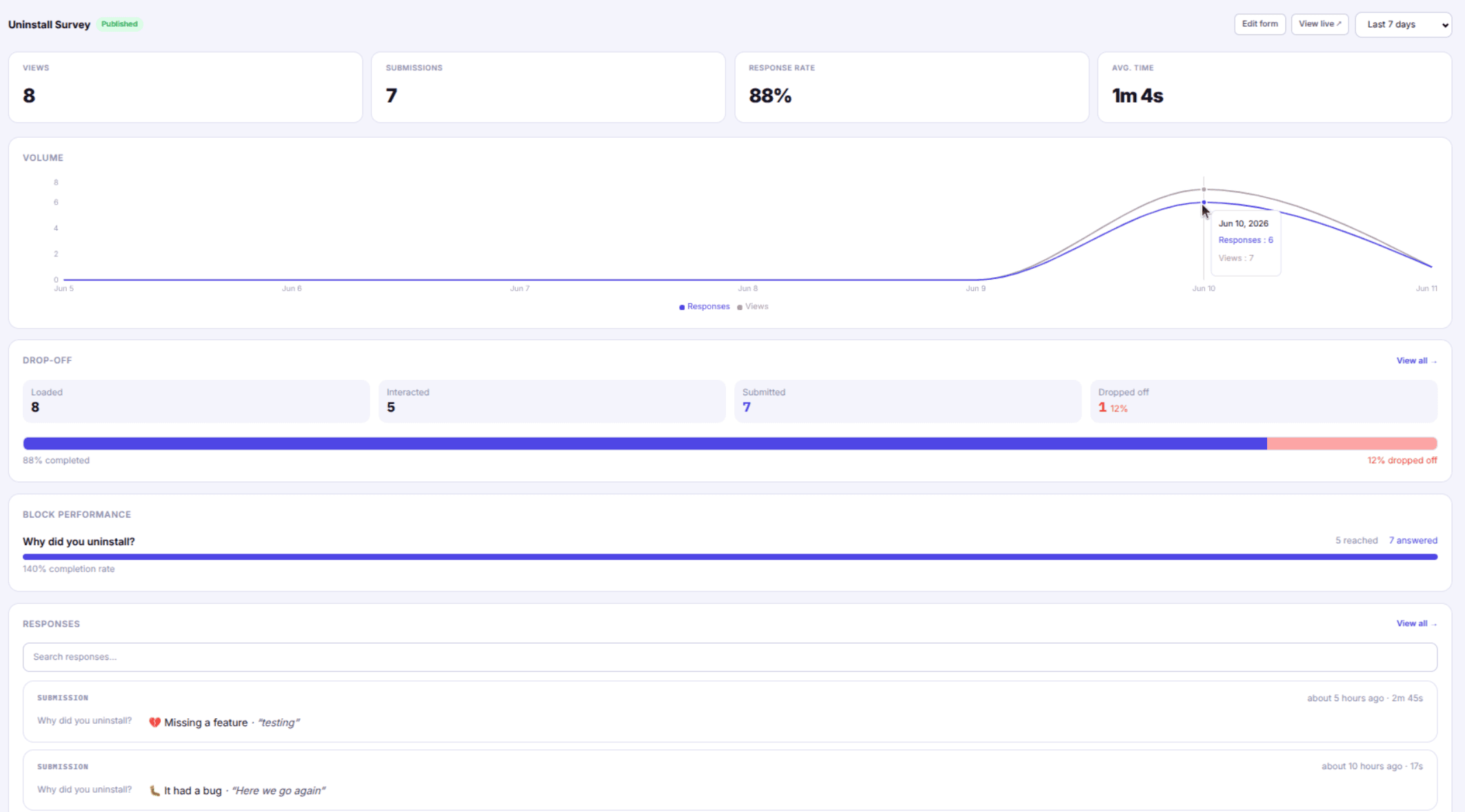
Track how many users opened your form, selected a reason, started a comment, and submitted. A step-by-step funnel shows your biggest drop-off point — so you know whether to fix the question, the options, or the flow.
Start for freeDrop-off funnel
Uninstall reasons
Insights
Bar chart of uninstall reasons sorted by frequency. Filter the response feed by reason. Spot what's driving churn before it becomes a trend, and share the data directly with your team.
Start for freeBranding
Your extension's icon and accent colour on the form. Feels like your product — not a third-party survey. Fully white-labelled on Pro — no UserFeed badge, no mention of us.
Start for freeSorry to see you go.
Why did you uninstall?
Responses ÷ form views, tracked over time. Know when your question stops converting.
Correlate uninstall spikes with your release history. Catch bad updates fast.
Tab-close events captured even when users bail without submitting.
Pricing
One extension is free forever. Pay only for what you use — extensions, extra forms, and retention.
Free
$0
One extension, always free
Pro
$2/ extension / mo
Add extensions, forms, and retention as you grow.
Pro add-ons
Example: 2 extensions + 1 extra form + unlimited retention = $2 + $2 + $1 + $1 = $6/mo
No credit card required to start. Cancel any time. Prorated when you upgrade mid-cycle.
Frequently asked questions
How does UserFeed work with Chrome's setUninstallURL?
Chrome lets each extension register one URL to open when a user uninstalls. UserFeed gives you that URL. When a user uninstalls, Chrome opens your UserFeed form. No background script needed beyond the one-line registration.
Will this slow down my extension?
No. setUninstallURL() is a passive registration — it stores a URL and does nothing else. There is no tracking script, no injected content, and no impact on your extension's performance or startup time.
What's the difference between a form view and a submission?
A view is recorded the moment the form page loads — even if the user closes the tab immediately. A submission is recorded when they click "Submit feedback." The drop-off funnel shows how many views turned into submissions and where people bailed.
Is there a free plan?
Yes. The free plan covers one extension and up to 100 responses per month — enough to validate the integration and start collecting data. No credit card required to start.
How is this different from a Google Form?
Google Forms require manual URL setup, have no Chrome-native integration, show no drop-off funnel, collect no exit events, and have no branded styling. UserFeed is purpose-built for the Chrome uninstall flow — setup is one line of code and the analytics are built around how extension users actually behave.
Set up in 5 minutes. No infrastructure. Cancel any time.
Start collecting feedback